Welcome to the 2017 HE292 Midterm. Relax. This is going to be a piece of cake.

Instructions
You will have until exactly 11:30AM to complete this test. Although finishing fast may look impressive, even more impressive is how thorough and careful you are (within limits, of course...), so do feel free to take up the entire time if you need it. There are many skills which will be tested in this test, but perhaps the most important one is "resourcefulness" - showing that you can use a variety of tools to arrive at the best solution.
Please follow all the steps below.
Please follow all the steps below.
STEP 1 - Setup
TEST YOUR 'GRAVADOR DE PASSOS' ON YOUR COMPUTER. From the 'Start' menu, type in the word "PSR" or "gravar", and you should see "psr.exe" or "Gravar etapas para reproduzir um problema". Click on that, and the following should appear:

If you cannot locate this, please ask for help.
Click on the "record" (or "gravar") red button, and perform a few actions on your computer. (For example, navigate to a new website, open up Word, etc.) On any screen, click on "Add comment", click on anywhere in the screen, or highlight any portion of the screen, and write a brief comment -- a few words is fine -- in the comment box:
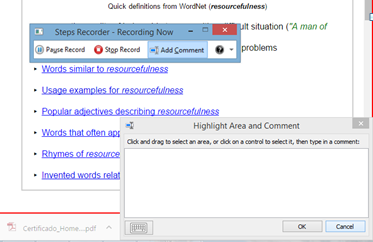
You should be adding comments often during your work, especially where you want to share your insights, etc. with others.
Then click on "stop". You will see that you can now "save". Click on the "save" icon, and save the output to the desktop. Open the file and look at the output. This is what you will be sending to me.
STEP 2 - Translation 1
|
|
|
STEP 3 - Translation 2
|
|

STEP 4 - Ad Hoc Corpus Construction and Use
- Start Steps Recorder. Click "gravar".
- Download this journal article.
- Create a corpus based on the theme of the above article and consisting of 7 articles in English.
- Be sure to save the seven text (".txt") files in a place where you can find them later. (You will email them to me at the end of this test.)
- Upload the corpus into AntConc.
- Create a Word List.
- Save the Word List with a name that will make it easy to identify (for example "Fulano_Midterm_Wordlist").
- BONUS: If you have time (and "vontade"), then feel free to use any other tools you are familiar with, or want to experiment with, within AntConc.
- Stop Steps Recorder. Save output file somewhere you can find easily.
- Analyze the first 100 items in the created Word List.
- On a separate Word document, make a list of 10 words that you think are very important. Write a commentary on your choices.
- Are there any other interesting aspects to the list you created? Make notes on the same Word document.
- What are the strengths (e.g. possible applications) and potential limitations to the word list? Write your answer on the same Word document.
- Send an email to [email protected] with "HE292 Midterm Corpus Work" in the subject line.
- In the email, attach all 3 sets of files from this Step: (1) the 7 text files (can also send the zip file), (2) the Word List output (and any other saved output), and (3) the Steps Recorder file.
- Copy the notes that you made about the Word List in the Word document, and paste the answers into the email. (Alternatively, you may save the Word doc and send it as an attachment.)
- Next, you should... Oh no - wait. This is the end of the test.
Done!